Is this normal on iPad Pro?

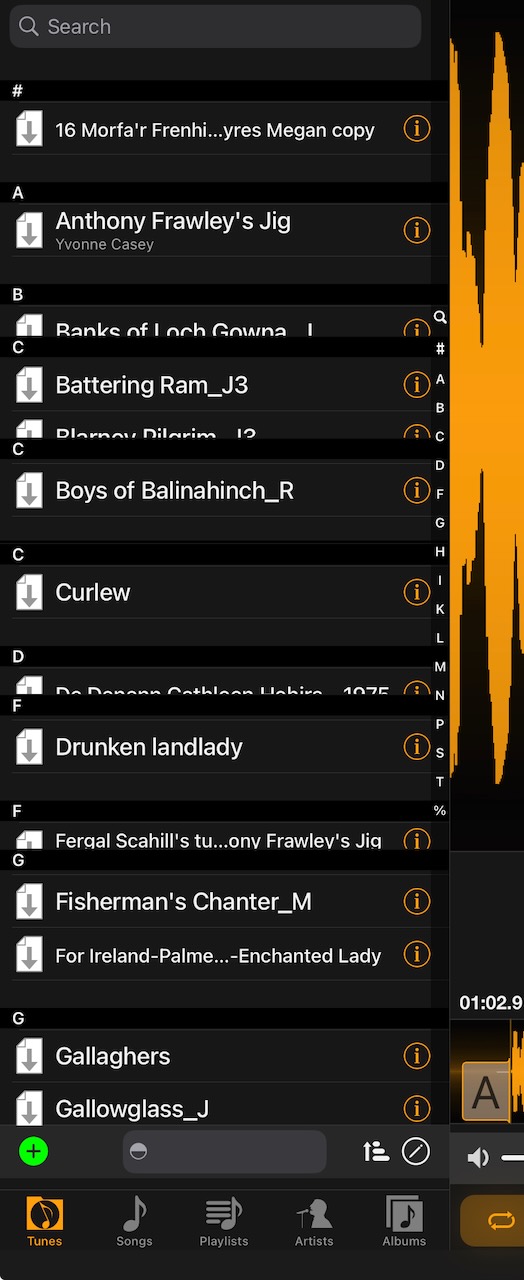
-
Official comment

No, that is not expected.
You could try restarting Anytune, restarting your device and updating Anytune.
Please submit a request and tell us which hardware, iOS version and Anytune version you are running.
Select Help > "Contact Us" in Anytune to provide this info automatically.
Please include what vale you are sorting on.
Your config data could be helpful in debugging this problem.- Tap Sharing
- Tap "Share Song Settings and Marks"
- Choose "All Songs"
- Choose "Email"
- Tap Share via Email/Open-In and send the Email to support@anytune.app
Thanks for sharing this anomaly.
Please ensure you have updated to the latest version of Anytune.
Please try disconnecting audio devices and Restarting Your Device. Sometimes a restart clears things up, especially after a OS upgrade.
Please tell us which hardware, iOS version and Anytune version you are runningMore details will help us identify the problem and a fix more quickly.
Please provide the steps you perform to reproduce the problem, what you observe and what you expect.
Sending us a screen capture or recording of the problem would be fantastic. See How to record the screen on your iPhone, iPad, or iPod touch. You can send large files to our Dropbox folder: https://anytune.app/upload-file.
If we can reproduce the problem in our lab we will be able to find a solution.
Please sign in to leave a comment.
Comments
1 comment